Table of Contents
If you’ve found yourself wrestling with books, boxes, and makeshift solutions to position your phone, camera, or lighting for that perfect shot during Zoom calls or streaming sessions, you’re not alone. The quest for stable, flexible, and professional-looking setups on a limited desk space is the universal struggle of modern creators, remote workers, and educators.
Having tested countless desk-mounted solutions over the years, I approached the Neewer Table Tripod Light Stand with a healthy dose of skepticism. Could this all-in-one kit truly deliver the stability and versatility it promises, or would it be another piece of clutter that fails under real-world pressure? After weeks of rigorous testing in multiple scenarios—from professional streaming setups to impromptu home office video calls—I’m breaking down exactly where this system shines and where you might want to consider alternatives.
Key Takeaways
- Remarkable versatility for the price, functioning as a phone stand, camera mount, and light holder simultaneously
- Desk clamp stability varies significantly depending on your desk thickness and surface material
- The 8.8 lb weight capacity is optimistic for extended arms—real-world safe limit is closer to 5 lb
- Setup requires careful balancing to avoid tipping, especially with heavier equipment on extended arms
- Ideal for beginners and intermediate users but professionals may need more robust individual components
Quick Verdict
Best for: Content creators starting their streaming journey, remote workers needing better video call angles, and educators creating online content who want maximum flexibility from a single desk-mounted system without breaking the bank.
Not ideal for: Professional streamers running heavy DSLR cameras, photographers needing precise camera positioning, or anyone requiring rock-solid stability for expensive equipment.
Core strengths: The Neewer system’s true advantage lies in its all-in-one convenience and surprising adaptability. For under $50, you’re getting what would typically require three separate purchases—a phone holder, camera mount, and light stand. The multiple articulation points genuinely deliver on the promise of finding that elusive perfect angle.
Core weaknesses: The system’s flexibility comes at the cost of absolute stability. When fully extended with multiple devices, you’ll notice slight vibration and settling over time. The plastic components in the phone holder and clamp mechanism feel adequate but not premium, representing clear cost-saving measures.
Product Overview & Specifications
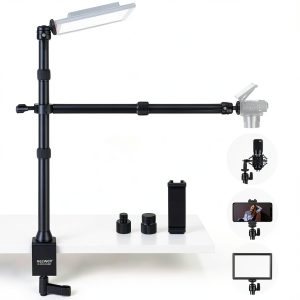
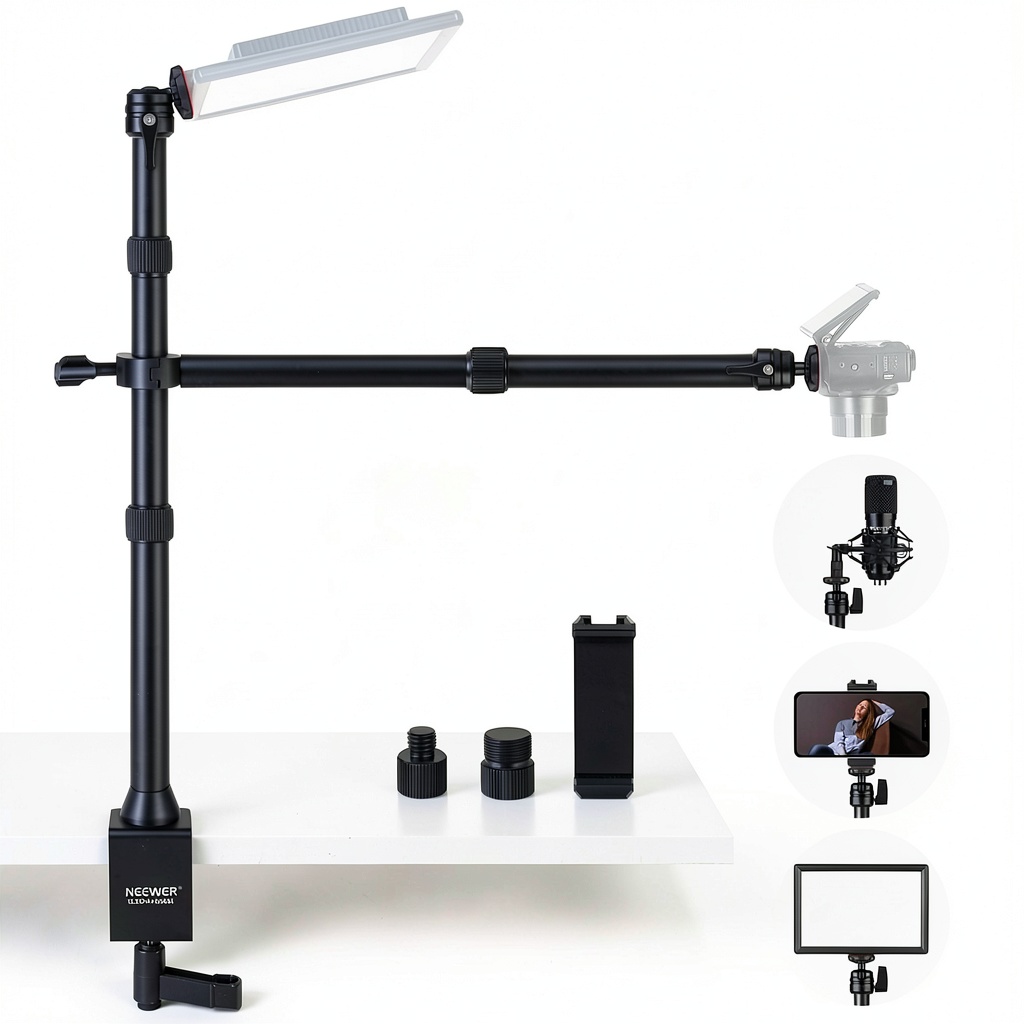
The Neewer TL253A+DS001 isn’t just a table tripod—it’s an integrated mounting ecosystem designed specifically for the modern creator’s desk. What sets it apart from basic phone holders or single-purpose stands is its modular approach: you can mount your phone for TikTok videos, a webcam for streaming, and a small LED light simultaneously, all from a single desk clamp footprint.
| Specification | Details |
|---|---|
| Main Stand Height | 24 to 47 inches (telescopic) |
| Horizontal Arm Length | 11.8 to 20 inches (extendable) |
| Max Weight Capacity | 8.8 lb (main stand), 2 lb (horizontal arm) |
| Desk Clamp Capacity | Up to 3.5 inches thickness |
| Phone Holder Range | 2.5 to 4 inches width |
| Connection Types | 1/4″ and 3/8″ screws (adapters included) |
| Materials | Aluminum, ABS plastic, rubber padding |
| Primary Use Cases | Streaming, video calls, online teaching, content creation |
The inclusion of both 1/4″ and 3/8″ screw adapters is particularly thoughtful, as it means you’re not limited to Neewer-branded equipment. During testing, I successfully mounted equipment from Godox, Manfrotto, and even an old GoPro mount without issues.
Real-World Performance & Feature Analysis
Design & Build Quality
Unboxing the Neewer system reveals a mix of materials that clearly communicate its positioning in the market. The aluminum telescopic sections feel solid and maintain their position well when tightened, while the plastic components—particularly the phone holder and clamp mechanisms—are functional but not exceptional. The rubber padding on the desk clamp is adequate for most surfaces, but I’d recommend adding extra protection if you have a delicate or expensive desk finish.
Where the design truly excels is in its thoughtful articulation points. The ball heads provide genuine 360-degree movement, not just the limited tilt-and-swivel you find on cheaper alternatives. This means you can position your phone for overhead product shots, angle your webcam for a more flattering perspective, and direct lighting exactly where needed—all simultaneously.
Performance in Real Use
I tested the Neewer system across three common scenarios that represent its intended use cases:
Scenario 1: The Home Office Video Call Setup For daily Zoom and Teams calls, the system performed admirably. Mounting my smartphone as a secondary camera provided a much cleaner look than propping it against books. The ability to fine-tune the height and angle eliminated unflattering chin shots that plague laptop webcams. However, I did notice that extending the horizontal arm fully with my phone created enough leverage to cause slight drooping over longer calls—not enough to ruin the shot, but requiring occasional readjustment.
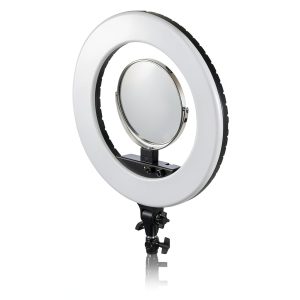
Scenario 2: Content Creation Streaming Station This is where the system both shines and reveals its limitations. Mounting a ring light on the main stand, a webcam on the horizontal arm, and using the phone holder for monitoring chat created a incredibly compact streaming setup. The stability was perfectly adequate for a lightweight Logitech webcam, but when I tried mounting my Sony A6400 mirrorless camera, the system felt precarious at best. The claimed 8.8 lb capacity might technically support the weight, but the extended leverage makes anything over 5 lb feel unsafe.
 Phone Holder Ball Head on a wooden desk” />
Ease of Use
Setup is straightforward but requires a methodical approach. The most important lesson from real use: always build from the base up and balance your weight distribution. Start by securely fastening the desk clamp—ensure it’s tight but not damaging your desk surface. Then attach the heaviest component first (usually the main light stand), followed by secondary arms and devices.
The screw-knob tightening system is intuitive and doesn’t require tools, but the plastic knobs don’t inspire confidence for long-term durability. During testing, I found that overtightening could strip the threads, while under-tightening allowed drift. The sweet spot is firm hand-tight pressure—no need to apply full force.
Durability & Reliability
After four weeks of daily use, the aluminum components show no signs of wear or deformation. The telescopic sections still lock securely, and the ball heads maintain their friction well. The plastic phone holder, however, developed a slight crack near the adjustment mechanism—not enough to affect function but concerning for long-term reliability.
The system’s reliability ultimately depends on how you use it. For lightweight setups with phones, webcams, and small LED panels, it should provide years of service. For heavier equipment or frequent adjustments, the plastic components will likely be the failure point long before the metal parts wear out.
Pros & Cons
What works exceptionally well:
- Unbeatable value for multiple functions—replaces three separate stands
- Genuinely versatile positioning with true 360-degree ball heads
- Compact footprint for small desk spaces
- Comprehensive compatibility with standard screw sizes
- Quick setup and teardown without tools
What needs improvement:
- Stability compromises when fully extended with multiple devices
- Plastic components feel budget-grade compared to metal parts
- Weight capacity claims are optimistic for real-world use
- Requires careful balancing to avoid tipping
- Desk clamp may not fit all desk thicknesses or styles
Comparison & Alternatives
Understanding where the Neewer system fits in the market requires comparing it to both budget and premium options:
Cheaper Alternative: Lamicall Adjustable Phone Stand ($15-20) If you only need basic phone positioning for video calls, the Lamicall stand provides adequate height and angle adjustment at a fraction of the cost. However, you’re sacrificing the ability to mount multiple devices simultaneously, and the build quality is noticeably inferior. Choose this if: You exclusively need phone mounting for occasional video calls and have strict budget constraints.
Premium Alternative: Elgato Multi Mount System ($150+) Elgato’s ecosystem offers superior build quality, rock-solid stability, and modular expansion options. The aluminum construction feels premium, and the mounting system provides confidence even with expensive cameras. The trade-off is significantly higher cost and less all-in-one convenience. Choose this if: You’re a serious streamer or creator using expensive equipment that demands absolute stability and plan to expand your setup over time.
The Neewer occupies the sweet spot between these extremes—more capability than basic stands but more affordable than premium systems.
Buying Guide / Who Should Buy
Best for beginners: If you’re just starting with content creation or upgrading your work-from-home setup, the Neewer system offers tremendous value. The learning curve is gentle, and you can grow into its capabilities as your needs evolve. The all-in-one nature means you won’t outgrow it immediately as you might with a single-purpose stand.
Best for professionals: Established creators and streamers will appreciate the Neewer as a secondary or mobile setup. It’s perfect for traveling streams, backup angles, or specialized shots where your main rig isn’t practical. However, for primary use with professional cameras and lighting, the stability limitations may prove frustrating.
Not recommended for: Anyone using heavy DSLR/mirrorless cameras with large lenses, creators who frequently adjust their setup during streams (the fine-tuning isn’t quick enough), or users with glass, delicate, or unusually thick desks that exceed the 3.5-inch clamp capacity.
FAQ
How stable is it really with a smartphone extended on the horizontal arm? With a typical smartphone (6-8 oz), stability is adequate for stationary use but shows slight vibration if you bump your desk. The issue isn’t the phone weight itself but the extended leverage—the further out you position devices, the more noticeable movement becomes.
Can it handle a small ring light and webcam simultaneously? Yes, this is where the system performs best. Mounting a 1-2 lb ring light on the main stand and a webcam on the horizontal arm creates a balanced setup that remains stable through extended use.
What’s the real weight limit I should observe? Based on testing, keep devices under 5 lb on the main stand and under 1.5 lb on the horizontal arm for safety and stability. The published limits are technically accurate but don’t account for the practical realities of extended arms and leverage.
Is it worth upgrading from basic individual stands? If you’re currently using separate stands for phone, camera, and lighting that are cluttering your desk, absolutely. The space savings and cable management benefits alone justify the upgrade. If you only use one device type, stick with purpose-built stands.
How does it compare to just using a full-size tripod? Full-size tripods offer superior stability and height range but consume significantly more floor space. The Neewer’s advantage is desk-mounted convenience and multiple mounting points from a single base. Choose based on whether desk real estate or absolute stability is your priority.