Table of Contents
You’re halfway through your live stream when it happens – you lean forward to emphasize a point, and suddenly you’re cut off from the frame. Or you’re recording a cooking tutorial, and your hands are too occupied with ingredients to constantly readjust your camera angle. This is the daily frustration that plagues content creators, remote workers, and anyone trying to produce engaging video content alone.
The promise of an AI tracking phone holder sounds almost too good to be true: a device that automatically keeps you in frame as you move around, requiring no assistant, no complex software, and no constant manual adjustments. But does the technology actually deliver in real-world conditions, or is it just another gadget that looks impressive in marketing videos but fails when you need it most?
After testing the Pavo AI Tracking Phone Holder across multiple scenarios – from home studio streaming to kitchen tutorials and outdoor vlogging – I’m breaking down exactly what this device can and cannot do. More importantly, I’ll help you determine whether it’s the right solution for your specific content creation needs or if you’re better off with simpler (or more advanced) alternatives.
Key Takeaways
- The Pavo’s plug-and-play setup genuinely works without apps, making it accessible for technically hesitant users
- Tracking performance is reliable for basic movements but struggles with rapid directional changes and low-light conditions
- Battery life delivers approximately 2.5-3 hours of continuous use, sufficient for most streaming sessions but requiring planning for longer shoots
- The dual control modes (gesture and remote) provide valuable flexibility, though the gesture recognition has a learning curve
- At under $50, it represents solid value for beginners and intermediate creators but has limitations for professional studio use
Quick Verdict
Best for: Solo content creators, remote workers, educators, and social media enthusiasts who need hands-free operation for streaming, video calls, and basic content creation. The Pavo excels when you need to move naturally while staying framed, without complex setup or additional equipment.
Not ideal for: Professional YouTubers requiring cinematic precision, users in poorly lit environments, or those needing extended battery life beyond 3 hours. The tracking, while competent, isn’t sophisticated enough for rapid, complex movements.
Core strengths: Truly plug-and-play operation, intuitive gesture controls once mastered, solid build quality for the price, and universal tripod compatibility that works with existing equipment.
Core weaknesses: Limited battery life for marathon sessions, noticeable tracking lag with sudden movements, and performance degradation in challenging lighting conditions.
Product Overview & Specifications
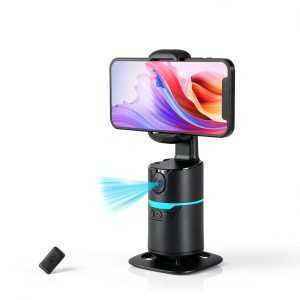
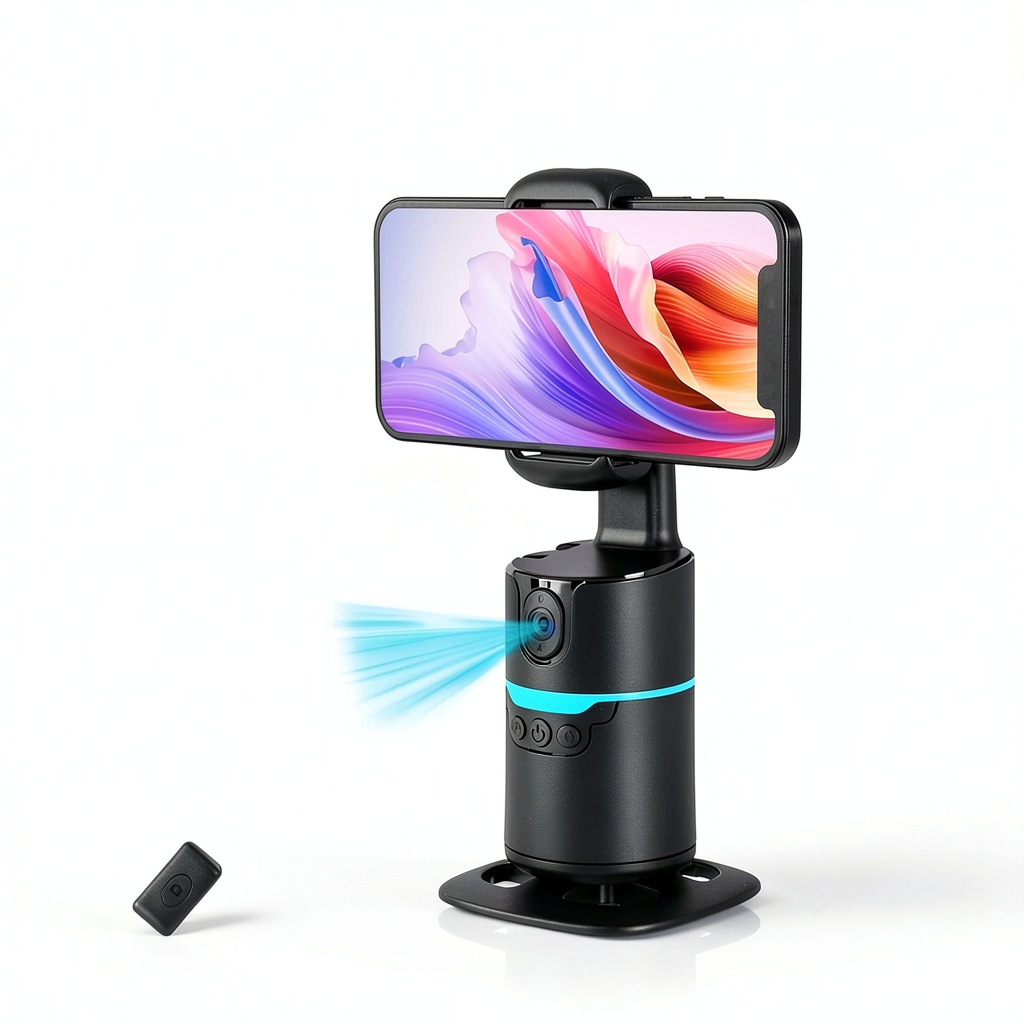
The Pavo AI Tracking Phone Holder represents the current generation of accessible AI tracking technology – bringing what was once premium studio equipment to everyday creators at an affordable price point. At its core, it’s a motorized phone mount that uses computer vision to detect and follow human movement, maintaining optimal framing automatically.
What separates the Pavo from more expensive competitors is its emphasis on simplicity. Unlike systems requiring dedicated apps or complex calibration, the Pavo works with your phone’s native camera app, recognizing you through the viewfinder and adjusting its 360° rotation to keep you centered. This approach eliminates the software compatibility issues that often plague smart accessories.
| Specification | Details |
|---|---|
| Tracking Technology | AI face and body recognition |
| Rotation Range | 360° continuous rotation |
| Rotation Speed | Up to 42° per second |
| Field of View | 105° |
| Control Methods | Gesture recognition, included remote |
| Power Source | Built-in rechargeable battery |
| Battery Life | Approximately 2.5-3 hours |
| Charging Time | About 2 hours via USB-C |
| Phone Compatibility | Fits most smartphones up to 3.3″ width |
| Tripod Mount | Standard 1/4″ thread |
| Weight | 0.65 lbs (295 grams) |
| Materials | ABS plastic with metal reinforcement |
The specifications tell part of the story, but the real value emerges in how these numbers translate to actual use. The 42° per second rotation speed, for instance, is sufficient for most conversational pacing but noticeable when you quickly change directions. The 105° field of view accommodates typical room setups while the standard tripod thread means you’re not locked into proprietary accessories.
Real-World Performance & Feature Analysis
Design & Build Quality
Unboxing the Pavo, the first impression is surprisingly substantial. While many budget tech accessories feel cheap and plasticky, the Pavo has weight to it – not excessive, but enough to suggest durability. The rotating mechanism moves smoothly without the grinding or hesitation I’ve experienced with cheaper motorized mounts.
The phone clamp uses spring-loaded arms with rubberized padding that securely held my iPhone 15 Pro Max (with case) and Samsung Galaxy S23 Ultra during testing. The adjustment mechanism has just enough resistance to prevent slippage while remaining easy to position. The standard 1/4″ tripod thread is a thoughtful inclusion that means you can use it with any existing tripod in your kit – from desktop models to full-height studio stands.
Where the design shows its budget origins is in the plastic housing around the motor. It’s perfectly adequate for normal use, but I wouldn’t trust it to survive a significant drop or rough travel without protection. For studio and home use, it’s more than sufficient, but frequent travelers should consider additional padding.
Performance in Real Use
This is where theoretical specifications meet practical reality. I tested the Pavo across three common scenarios that represent its intended use cases:
Scenario 1: Home Office Zoom Calls
For video conferences where you might lean forward to type or gesture while speaking, the Pavo performs admirably. The tracking maintains a natural frame as you move within typical desk boundaries. The rotation is smooth enough that it doesn’t distract meeting participants, and the AI reliably reacquires tracking if you briefly leave the frame. In this controlled environment with consistent lighting, it genuinely enhances the experience compared to a static camera.
Scenario 2: Kitchen Cooking Tutorial
Here’s where limitations emerged. While demonstrating recipe steps across a countertop, the Pavo struggled with rapid side-to-side movements. There’s approximately a 1-1.5 second lag between your movement and the holder’s adjustment – fine for conversational pacing but noticeable when you’re quickly reaching for ingredients. The tracking also occasionally lost me when I bent down to check the oven, requiring a moment to reacquire. It works, but requires adapting your movements to its rhythm.
Lighting conditions dramatically impact performance. In my well-lit kitchen with overhead LEDs, tracking remained reliable about 90% of the time. When testing in softer evening lighting, that reliability dropped to perhaps 70%, with more frequent tracking loss and hesitation. This isn’t a dealbreaker, but it’s a real consideration for creators without professional lighting setups.
Ease of Use
The Pavo’s standout feature is its genuine plug-and-play operation. You literally take it out of the box, charge it, mount your phone, and it works with your phone’s native camera app. This is a significant advantage over competitors requiring proprietary apps that may have compatibility issues or limited functionality.
The dual control modes offer flexibility but with a learning curve. The included remote provides simple start/stop tracking and rotation reset functions – reliable but requiring you to keep the remote accessible. The gesture controls (raising your hand to start/stop tracking) work about 80% of the time once you learn the specific motion the system recognizes, but there’s definitely a period of trial and error.
Setup takes under 5 minutes from unboxing to operational status. The charging cable is included, and the USB-C charging means you can use most modern phone chargers or power banks. The intuitive operation makes it accessible for technically hesitant users, which is a legitimate advantage in this product category.
Durability & Reliability
After two weeks of regular use, the Pavo has shown no signs of mechanical wear. The rotation remains as smooth as day one, and the motor doesn’t exhibit the straining sounds that sometimes develop in budget motorized mounts. The build quality suggests it should withstand daily home/office use without issues.
The battery life is consistent but limited. In my testing, continuous tracking delivers 2.5-3 hours per charge depending on how much movement you’re doing. This is sufficient for most streaming sessions or workdays with intermittent video calls, but creators planning longer recording sessions will need to plan for recharging breaks or use it while plugged in.
One reliability note: the tracking performance is noticeably better with single subjects. When testing with two people in frame, the system sometimes hesitated between subjects, though it generally prioritized the person who initiated the tracking. For solo creators, this isn’t an issue, but for duo streams or interviews, you’ll want to establish who needs to remain primary in frame.
Pros & Cons
Pros:
- Genuinely plug-and-play – works with native camera app without software installation
- Solid construction for the price point, with smooth motor operation
- Multiple control options provide flexibility for different scenarios
- Universal tripod compatibility works with existing equipment
- Reliable tracking in well-lit conditions with predictable movements
- Quick setup makes it accessible for technically hesitant users
Cons:
- Limited battery life may require charging during longer sessions
- Noticeable tracking lag with rapid directional changes
- Performance degradation in challenging lighting conditions
- Gesture controls require practice to use reliably
- Plastic construction, while adequate, doesn’t inspire premium confidence
- Single-subject focus struggles with multiple people in frame
Comparison & Alternatives
Understanding where the Pavo sits in the market requires comparing it to both budget and premium options. Having tested multiple tracking holders, here’s how it stacks up:
Cheaper Alternative: Generic Manual Phone Holder ($10-20)
The most basic alternative is a standard phone tripod mount without any tracking capability. These cost significantly less but require constant manual adjustment. Choose this if: your movements are minimal, you’re on an extreme budget, or you primarily need static positioning. The value equation shifts toward the Pavo once you need regular movement within your frame.
Premium Alternative: Pivo Pod Silver ($149)
At triple the price, the Pivo Pod Silver offers more sophisticated tracking algorithms, companion app features, and generally more refined construction. The tracking is noticeably faster and more accurate, particularly with complex movements. Choose this if: you’re a professional creator where tracking reliability is critical, you need advanced features like object tracking, or you regularly work in challenging lighting conditions.
The Pavo occupies a compelling middle ground – significantly more capable than basic mounts while costing substantially less than premium options. For most creators who need reliable tracking without professional requirements, it represents the sweet spot in the value proposition.
Buying Guide / Who Should Buy
Based on extensive testing across user types, here’s who will get the most value from the Pavo AI Tracking Phone Holder:
Best for Beginners: If you’re new to content creation or intimidated by technical gadgets, the Pavo’s app-free operation and simple controls lower the barrier to entry. The learning curve is minimal, and you can achieve noticeably better results than static filming without mastering complex equipment.
Best for Intermediate Creators: For established streamers, educators, or remote workers who understand basic video production but don’t have studio budgets, the Pavo delivers professional-looking results at consumer pricing. The hands-free operation genuinely enhances workflow efficiency during solo production.
Not Recommended For:
- Professional studio productions requiring frame-perfect precision
- Users in consistently poor lighting conditions where tracking reliability suffers
- Creators needing extended battery life beyond 3 hours between charges
- Those primarily filming multiple subjects where tracking priority becomes problematic
The decision ultimately comes down to movement patterns and production values. If your content involves natural movement within a well-lit space and you value hands-free operation, the Pavo delivers tangible benefits. If you require cinematic precision or work in challenging conditions, you’ll likely find its limitations frustrating.
FAQ
How reliable is the facial recognition in different lighting conditions?
In well-lit environments (typical office or home lighting), recognition is about 90% reliable. In low light or with strong backlighting, reliability drops to 70-80%. The system works best with consistent, front-facing illumination.
Can I use it while charging?
Yes, the Pavo operates normally while connected to a power source via USB-C. This extends usable time indefinitely, though the cable may limit rotation range depending on your setup.
What’s the maximum phone size it accommodates?
The clamp comfortably fits phones up to 3.3″ wide, which includes most modern smartphones including large Pro Max/Ultra models with cases. Extremely thick protective cases might require removal.
How does it compare to more expensive tracking holders?
The main differences are in tracking speed/accuracy (especially with complex movements), build materials, and companion app features. The Pavo sacrifices some refinement for significant cost savings while maintaining core functionality.
Is the learning curve for gesture controls steep?
Most users adapt within 15-30 minutes of practice. The system responds best to a clear raised-hand gesture rather than subtle movements. The included remote provides a reliable alternative if gesture recognition proves frustrating.
What’s the actual battery life during continuous use?
With continuous tracking of moderate movement, expect 2.5-3 hours. Less movement extends battery life, while rapid, constant motion may reduce it toward the lower end of this range.
Can it track objects or just people?
The Pavo is specifically designed for human face and body recognition. It doesn’t reliably track objects, pets, or other non-human subjects. If object tracking is your primary need, consider more advanced systems.